Feature Board
The Feature Board is your direct feedback channel to the Suprvisr AI team — and a fun way to shape what gets built. Submit bugs, request features, suggest integrations, and upvote the ideas your teammates have submitted.
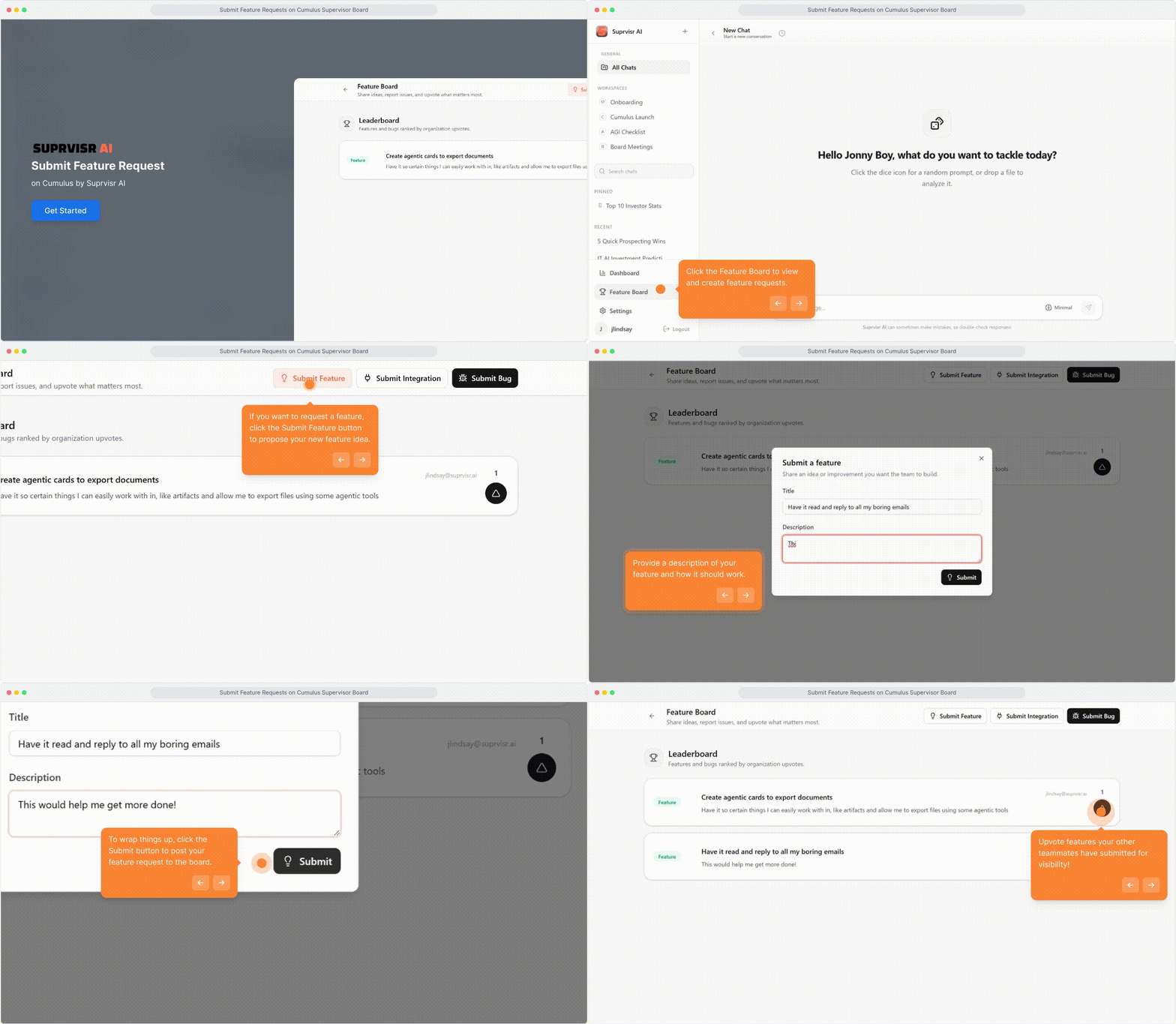
Your org’s ideas, your vote
The Feature Board is scoped to your organization. You see your team’s submissions — not what other companies are requesting — and your team votes on what matters most to you.
We use the voting data to understand what features will make the biggest impact. The higher something is upvoted within your organization, the more visibility it gets with our team.
We don’t share what your organization is requesting with other organizations. Your feedback is private to your team and the Suprvisr AI team.
Opening the Feature Board
Click the Trophy icon in the bottom-left sidebar, or navigate to /feature-board.
Submitting a request
Feature Request
Click “Submit Feature”
Opens a dialog with a title and description field.
Describe what you want
Be specific: what problem does this feature solve? Who on your team benefits?
Submit
Your request goes live on the board immediately.
Bug Report
Click “Submit Bug”
Opens a structured form.
Fill in each field
| Field | What to include |
|---|---|
| What is the bug? | Short, clear title |
| When did it happen? | Timestamp or context (e.g., “while uploading a file”) |
| What should have happened? | Expected behavior |
| Additional details | Any other context that helps |
Submit
The report is sent to the Suprvisr AI team immediately.
Integration Request
Click “Submit Integration”
Opens the integration request form.
Describe the integration
- Integration name — what tool? (e.g., Salesforce, Jira, HubSpot)
- Expected functionality — what should it do inside Cumulus?
- API or MCP link — optional, but speeds up evaluation
Submit
Upvoting
See something your teammate submitted that you want too? Click the upvote (triangle) button to show your support. The board sorts by upvotes — popular ideas rise to the top.
Before submitting a new request, scroll through the board first. Upvoting an existing idea is more impactful than a duplicate submission — consolidating votes sends a stronger signal to the team.
Request types
| Badge | Color | Use for |
|---|---|---|
| Bug | Red | Something is broken or behaving unexpectedly |
| Feature | Green | New functionality you’d like added |
| Integration | Blue | Connecting Cumulus with another tool or service |
Related
- Admin Setup — managing your organization
- Changelog — see what’s already been shipped